This is an unofficial PyTorch implementation of PatchTST created by Ignacio Oguiza (oguiza@timeseriesAI.co) based on:
In this notebook, we are going to use a new state-of-the-art model called PatchTST (Nie et al, 2022) to create a long-term time series forecast.
Here are some paper details:
Nie, Y., Nguyen, N. H., Sinthong, P., & Kalagnanam, J. (2022). A Time Series is Worth 64 Words: Long-term Forecasting with Transformers. arXiv preprint arXiv:2211.14730.
Official implementation:: https://github.com/yuqinie98/PatchTST
@article{Yuqietal-2022-PatchTST,title={A Time Series is Worth 64 Words: Long-term Forecasting with Transformers},author={Yuqi Nie and Nam H. Nguyen and Phanwadee Sinthong and Jayant Kalagnanam},journal={arXiv preprint arXiv:2211.14730},year={2022}}
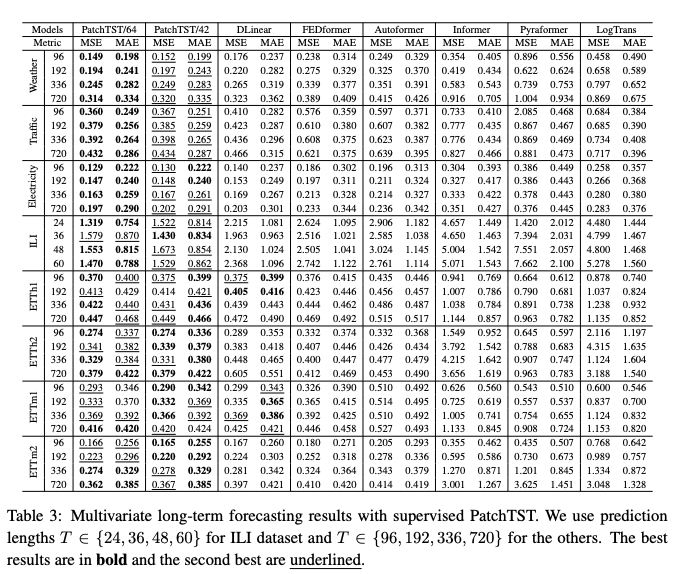
PatchTST has shown some impressive results across some of the most widely used long-term datasets for benchmarking:
def PatchTST( c_in, # number of input channels c_out, # used for compatibility seq_len, # input sequence length pred_dim:NoneType=None, # prediction sequence length n_layers:int=2, # number of encoder layers n_heads:int=8, # number of heads d_model:int=512, # dimension of model d_ff:int=2048, # dimension of fully connected network (fcn) dropout:float=0.05, # dropout applied to all linear layers in the encoder attn_dropout:float=0.0, # dropout applied to the attention scores patch_len:int=16, # patch_len stride:int=8, # stride padding_patch:bool=True, # flag to indicate if padded is added if necessary revin:bool=True, # RevIN affine:bool=False, # RevIN affine individual:bool=False, # individual head subtract_last:bool=False, # subtract_last decomposition:bool=False, # apply decomposition kernel_size:int=25, # decomposition kernel size activation:str='gelu', # activation function of intermediate layer, relu or gelu. norm:str='BatchNorm', # type of normalization layer used in the encoder pre_norm:bool=False, # flag to indicate if normalization is applied as the first step in the sublayers res_attention:bool=True, # flag to indicate if Residual MultiheadAttention should be used store_attn:bool=False, # can be used to visualize attention weights):
Base class for all neural network modules.
Your models should also subclass this class.
Modules can also contain other Modules, allowing them to be nested in a tree structure. You can assign the submodules as regular attributes::
import torch.nn as nn
import torch.nn.functional as F

class Model(nn.Module):
    def __init__(self) -> None:
        super().__init__()
        self.conv1 = nn.Conv2d(1, 20, 5)
        self.conv2 = nn.Conv2d(20, 20, 5)

    def forward(self, x):
        x = F.relu(self.conv1(x))
        return F.relu(self.conv2(x))
Submodules assigned in this way will be registered, and will also have their parameters converted when you call :meth:to, etc.
.. note:: As per the example above, an __init__() call to the parent class must be made before assignment on the child.
:ivar training: Boolean represents whether this module is in training or evaluation mode. :vartype training: bool
from fastcore.test import test_eqfrom tsai.models.utils import count_parametersbs =32c_in =9# aka channels, features, variables, dimensionsc_out =1seq_len =60pred_dim =20xb = torch.randn(bs, c_in, seq_len)arch_config=dict( n_layers=3, # number of encoder layers n_heads=16, # number of heads d_model=128, # dimension of model d_ff=256, # dimension of fully connected network (fcn) attn_dropout=0., dropout=0.2, # dropout applied to all linear layers in the encoder patch_len=16, # patch_len stride=8, # stride )model = PatchTST(c_in, c_out, seq_len, pred_dim, **arch_config)test_eq(model.to(xb.device)(xb).shape, [bs, c_in, pred_dim])print(f'model parameters: {count_parameters(model)}')
try:import onnximport onnxruntime as orttry: file_path ="_model_cpu.onnx" torch.onnx.export(model.cpu(), # model being run inp, # model input (or a tuple for multiple inputs) file_path, # where to save the model (can be a file or file-like object) input_names = ['input'], # the model's input names output_names = ['output'], # the model's output names dynamic_axes={'input' : {0 : 'batch_size'}, 'output' : {0 : 'batch_size'}} # variable length axes )# Load the model and check it's ok onnx_model = onnx.load(file_path) onnx.checker.check_model(onnx_model)del onnx_model gc.collect()# New session ort_sess = ort.InferenceSession(file_path) output_onnx = ort_sess.run(None, {'input': inp.numpy()})[0] test_close(output.detach().numpy(), output_onnx) new_output_onnx = ort_sess.run(None, {'input': new_inp.numpy()})[0] test_close(new_output.detach().numpy(), new_output_onnx) os.remove(file_path)print(f'{"onnx":10}: ok')except:print(f'{"onnx":10}: failed')exceptImportError:print('onnx and onnxruntime are not installed. Please install them to run this test')
onnx and onnxruntime are not installed. Please install them to run this test